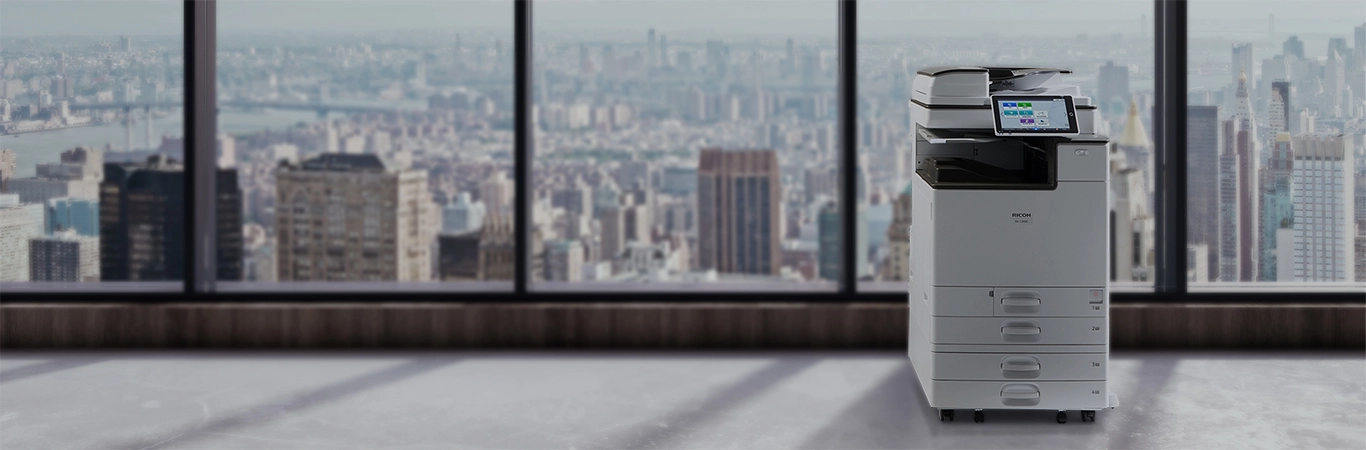

Ricoh Scanners in Dubai
At Gtech FZE, we are proud to be the largest distributor of Ricoh copiers, printers, and scanners worldwide. Our product range includes top-tier solutions from Ricoh and Fujitsu, known for their reliability, efficiency, and advanced features. Whether you need multi-function printers, mono-printers, all-in-one printers, or high-performance scanners, we have the perfect solution for your business needs in Dubai.
With over 2000 machines in stock at our Jebel Ali facility in Dubai, we ensure immediate availability and prompt service. We collaborate with leading IT manufacturers to provide our clients with the latest technological advancements and exceptional performance. Our reach extends across the Middle East and Africa, serving countries including Pakistan, UAE, Qatar, Kenya, Djibouti, Nigeria, Iran, Saudi Arabia, Afghanistan, Rwanda, Uganda, Ethiopia, and all other African countries.
Explore Our Range of Ricoh Scanners
Ricoh scanners have earned a reputation for their exceptional performance, reliability, and innovative technology. As a leader in the field of document management, Ricoh offers a diverse range of scanning solutions that cater to the unique needs of businesses of all sizes. Whether you are a small business looking for a compact Ricoh printer scanner or a large enterprise needing high-volume scanning capabilities, we have the perfect model for you. Our extensive lineup includes the Ricoh Aficio MP 2000 scanner, Ricoh MP C4503 scanner, and many others, ensuring that you find the ideal solution to enhance your operational efficiency.
One of the standout features of Ricoh scanners is their ability to streamline workflows. With advanced scanning technologies, these devices allow for quick and accurate digitization of documents, reducing the time spent on manual data entry and increasing productivity. Whether you need to scan invoices, contracts, or large documents, Ricoh scanners provide exceptional image quality and precision.
Moreover, the user-friendly interface of Ricoh scanners makes them accessible for users of all skill levels. Features like touch-screen controls, customizable settings, and one-touch scanning simplify the scanning process, making it efficient and hassle-free. For businesses that handle a high volume of paperwork, these features translate to significant time savings and improved productivity.
Ricoh also prioritizes connectivity in their scanners. Many models, such as the Ricoh MP 201 scanner, offer various connectivity options, including USB, Wi-Fi, and Ethernet. This flexibility allows users to integrate their scanners seamlessly into existing office networks, enabling easy sharing and access to scanned documents across multiple devices. Additionally, cloud connectivity options allow for direct uploads to popular cloud storage services, further enhancing accessibility and collaboration among team members.
In conclusion, Ricoh scanners stand out in the market for their quality, efficiency, and ease of use. By choosing a Ricoh scanner, you are investing in a reliable tool that not only meets your scanning needs but also supports your overall business operations. Explore our range of Ricoh scanners today and discover how they can transform your document management processes.
Key Features of Ricoh Scanners
Ricoh scanners are packed with features that enhance their usability and performance, making them a top choice for businesses seeking reliable document solutions. One of the most notable features is their advanced scanning capabilities, which ensure high-quality output every time. For instance, the Ricoh Aficio MP C2050 scanner utilizes high-resolution scanning technology, allowing users to capture intricate details in documents, which is essential for archiving and record-keeping.
Another key feature is the inclusion of OCR (Optical Character Recognition) technology. This feature enables users to convert scanned documents into editable and searchable text formats, significantly improving document management and retrieval. The ability to search through scanned documents saves time and enhances productivity, especially in environments where document access is critical. For professionals dealing with large volumes of paperwork, the OCR functionality in Ricoh scanners is a game-changer.
Batch scanning is yet another advantageous feature found in many Ricoh models. This allows users to scan multiple pages at once, which is particularly useful for businesses that handle extensive documentation. Models like the Ricoh MP 301 scanner are designed to facilitate fast and efficient scanning, reducing the time spent on repetitive tasks and freeing up valuable resources for other important functions.
Furthermore, Ricoh scanners are designed with user-friendliness in mind. Many models feature intuitive touch-screen interfaces that simplify the scanning process. Users can easily select scanning options, adjust settings, and even preview documents before scanning. This ease of use minimizes training time for new employees and enhances overall productivity.
Ricoh also emphasizes security in their scanners. Many models come equipped with advanced security features, including encryption and user authentication options. This is particularly important for businesses that handle sensitive information, as it ensures that scanned documents are protected against unauthorized access.
Additionally, Ricoh scanners support various file formats, enabling users to save scanned documents in PDF, JPEG, and TIFF formats. This versatility is beneficial for businesses that require different file types for various applications. Whether you need to create archives, share documents, or integrate them into other systems, Ricoh scanners can accommodate your needs.
In summary, the key features of Ricoh scanners—advanced scanning technology, OCR capabilities, batch scanning, user-friendly interfaces, security options, and versatile file format support—make them an excellent choice for businesses looking to enhance their document management processes. By investing in a Ricoh scanner, you are equipping your organization with a powerful tool that can significantly improve efficiency and productivity.
Connecting Your Ricoh Scanner
Connecting your Ricoh printer scanner to a computer or network is a straightforward process designed for ease of use. The first step is to ensure that your Ricoh scanner is powered on and properly set up in your workspace. Depending on the model, you may have multiple options for connectivity, including USB, Ethernet, and Wi-Fi. Each of these methods offers unique benefits, allowing you to choose the one that best suits your office setup.
If you opt for a USB connection, simply connect the scanner to your computer using a compatible USB cable. This method is ideal for personal use or small office environments where a direct connection is preferred. Once connected, your computer should automatically recognize the scanner, prompting you to install the necessary Ricoh scanner driver if it isn’t already installed. This driver is crucial for enabling communication between your scanner and computer, ensuring that you can access all the scanner’s features and functionalities.
For businesses that require more flexibility, connecting your Ricoh scanner via Wi-Fi or Ethernet is recommended. This allows multiple users to access the scanner from different devices within the network. To set up a network connection, you will typically navigate to the scanner’s settings menu and select the network option. Enter the necessary credentials, such as the Wi-Fi password or network name, and follow the prompts to establish the connection. Once set up, users can easily send scan jobs to the Ricoh scanner from their computers or mobile devices.
After establishing the connection, it’s essential to download the appropriate Ricoh scanner driver based on your operating system. The driver can usually be found on the official Ricoh support website. Installing the correct driver not only enables communication between your scanner and computer but also provides access to additional features such as advanced scanning options, customizable settings, and maintenance tools. Make sure to check for regular updates to the driver to ensure optimal performance.
For models like the Ricoh MP 201 scanner and Ricoh IS760D scanner, the setup process is designed to be user-friendly. Many users will find that the on-screen instructions guide them through the installation and configuration processes seamlessly. If you encounter any issues, Ricoh’s customer support and online resources can provide valuable assistance.
In addition to computer connectivity, Ricoh scanners often feature cloud integration capabilities. This allows users to directly upload scanned documents to popular cloud storage services, such as Google Drive or Dropbox. This functionality enhances accessibility, enabling team members to access scanned documents from anywhere, at any time, which is particularly useful for remote work environments.
In conclusion, connecting your Ricoh scanner is a simple process, whether you choose a direct USB connection or a network setup. By downloading the correct driver and utilizing the advanced features of your Ricoh scanner, you can maximize its potential and streamline your document management workflows. Whether you are using the Ricoh Aficio MP 171 scanner or any other model, ensuring proper connectivity will enhance your scanning experience and improve overall productivity.
Explore Our Ricoh Scanner Range
At our company, we are proud to offer a comprehensive range of Ricoh scanners designed to meet the diverse needs of businesses across various industries. Each model is engineered to deliver outstanding performance, exceptional image quality, and advanced features that enhance efficiency. For instance, the Ricoh MP 301 scanner is perfect for organizations looking for a reliable and versatile device that can handle a variety of scanning tasks with ease. This model combines speed and quality, making it suitable for both small offices and larger enterprises.
The Ricoh Aficio MP 171 scanner is another excellent option for businesses that require a compact yet powerful solution. This model is designed for ease of use and delivers high-quality scans, making it ideal for users who need to digitize documents quickly. Its compact size also makes it a great fit for smaller workspaces, ensuring that you can maximize your available office space without sacrificing functionality.
For organizations that handle high volumes of scanning, the Ricoh Aficio MP C4503 scanner stands out as a top choice. This multifunction printer offers advanced scanning capabilities, including the ability to handle both color and monochrome documents with exceptional speed and accuracy. Its user-friendly interface and customizable settings allow for efficient operation, making it a favorite among busy office environments.
Moreover, our selection includes specialized models such as the Ricoh IS200E and the Ricoh large format scanner, which cater to specific scanning needs. The IS200E is ideal for businesses that require high-speed scanning for documents and images, while the large format scanner is perfect for architectural plans, blueprints, and other oversized documents. These specialized models ensure that no matter your scanning requirements, there is a Ricoh scanner that meets your needs.
In addition to hardware capabilities, Ricoh scanners offer software solutions that enhance their functionality. Many models come equipped with Ricoh’s proprietary scanning software, which provides advanced options for file management, document organization, and data security. This software enables businesses to streamline their workflows, ensuring that scanned documents are easy to store, retrieve, and share among team members.
Furthermore, Ricoh’s commitment to sustainability is reflected in their scanner designs. Many models feature energy-saving modes and eco-friendly settings, allowing businesses to reduce their environmental footprint while maintaining high-quality scanning performance. This is particularly important for companies looking to implement sustainable practices in their operations.
In conclusion, exploring our range of Ricoh scanners reveals a wealth of options designed to meet a variety of business needs. From compact models like the Ricoh MP 171 scanner to high-performance units such as the Ricoh Aficio MP C4503 scanner, each device is equipped with features that enhance productivity, efficiency, and quality. By investing in a Ricoh scanner, you are equipping your organization with the tools necessary to thrive in today’s fast-paced business environment.
Why Choose Ricoh Scanners?
Ricoh scanners are renowned for their reliability, efficiency, and high-quality output. Whether you need a Ricoh printer scanner for office use or a specialized Ricoh document scanner for large-scale digitization projects, we have the perfect solution for you. With models ranging from the Ricoh Aficio MP 2000 scanner to the Ricoh MP C4503 scanner, our diverse lineup meets the needs of every business.
Key Features of Ricoh Scanners
Ricoh scanners boast a variety of features designed to enhance productivity. Many models, such as the Ricoh Aficio MP C2050 scanner, offer advanced scanning capabilities, including OCR (Optical Character Recognition) technology. This feature allows users to convert scanned documents into editable text, streamlining document management. Additionally, Ricoh's batch scanning function enables the quick processing of multiple pages, saving valuable time and resources.
Connecting Your Ricoh Scanner
Setting up your Ricoh printer scanner is a straightforward process. Ensure your scanner is connected to the network or directly to your computer via USB. For optimal performance, download the appropriate Ricoh scanner driver from the Ricoh website, tailored to your operating system. Whether you have a Ricoh MP 201 scanner or a Ricoh IS760D scanner, the setup process is designed to be user-friendly.
Explore Our Ricoh Scanner Range
Our extensive range of Ricoh scanners includes models such as the Ricoh MP 301 scanner, Ricoh Aficio MP 171 scanner, and the Ricoh SP 210SU scanner. Each model is designed to meet various scanning needs, from everyday office tasks to specialized scanning jobs. With robust performance and superior image quality, Ricoh scanners are the ideal choice for businesses looking to enhance their document workflow.
Frequently Asked Questions
GET IN TOUCH
Welcome to our contact page. We appreciate your interest in reaching out to us and are eager to assist you in any way we can. Whether you have questions, feedback, or specific inquiries, this is the place to get in touch with our team. Your communication is important to us, and we look forward to hearing from you.
Jebal Ali Freezone, Dubai , United Arab Emirates
+971 55 486 4800